Showing posts with label web resource. Show all posts

Wednesday, May 14, 2014

Spell Up: A New


Spell Up is a new word game that can help to improve English skills in a fun and educational way.

Whether they are just learning English or are already experts, have students give it a try: https://spellup.withgoogle.com/

I played it for about 20 minutes - it's not perfect but it's a lot of fun!

Thursday, March 27, 2014

Search for Tech Resources by Common Cores State Standard

Today's post comes from Mike Johnson, ITC over at Roosevelt.  He found an awesome resource and wrote about it beautifully... I love when educators can work together. :)  ENJOY!


Graphite, a resource from the fine folks at Common Sense Media, has done us a big favor by launching their Common Core Explorer. A couple, actually... 

First, finding a way to easily navigate the new Common Core Standards is a feat in itself. Even theCCSS website and iPad app are a tad tricky to search specific standards. Graphite's Common Core Explorer, on the other had, cuts the clutter, and makes looking for specific standards in specific content areas within your grade level a breeze. Really, really easy.


But, that's not Common Core Explorer's biggest contribution. What they've done is provide tech-based resources that target and compliment each and every standard. I'll say that again, because it's important: you can easily find tech-based resources by Common Core Standard using Graphite's Common Core Explorer. This makes it a handy little tool to have bookmarked in your browser, so that planning and incorporating tech resources become easier.

Tuesday, December 3, 2013

Holiday Fun on ABCYa!

It's the most wonderful time... of the year... 

Good thing I'm typing and not singing!    I wanted to share some of the fun games that ABCYa! has for winter holidays that would be great stations for students, or even better on the SMARTBoard.  Click on the title to be taken to the game.

Children love to play in the snow! 100 Snowballs is an interactive activity that gives children the opportunity to have fun by clicking and dragging snowballs around a winter scene. Children can create anything they imagine as long as it only uses 100 snowballs! This activity works well in the classroom on an interactive whiteboard.

Recommended for Grades: K,1,2,3,4,5

Ball Ornaments Puzzle is a fun winter holiday activity. Kids must find as many ornaments as possible by locating matches to the example ornaments shown. The game is over when all 150 ornaments have been found or when the time has run out. Points are awarded by how quickly ornaments are found.
Recommended for Grades: 4,5

The Christmas edition of Sugar, Sugar is a challenging logic puzzle with a physics twist and a holiday theme. Each level of the game is a puzzle that requires planning and strategy. The goal is to draw lines with your mouse to get sugar into the cups. You must fill each cup until the number reads zero. Kids and adults will enjoy it!
Recommended for Grades: 4,5

It's time to put up the Christmas lights! But wait! Before you can put up the Christmas lights, you must correctly answer as many math problems as you can in one minute. You can practice addition, subtraction, multiplication or division facts. The more math problems you solve correctly, the more lights you will be given to decorate your house!
Recommended for Grades: 1,2,3,4,5

Fun for all ages! Children click and drag different shapes to make a snowman. Kindergarten to second grade students learn and practice valuable mouse manipulation techniques. Have Fun!
Recommended for Grades: K,1,2,3,4,5

Christmas Tree Fun is a holiday activity for children. The activity guides children through a series of steps to decorate a Christmas Tree, put a surprise in a gift box, and then finally place the tree in a wintery scene. Children can design and place several trees in their scene along with different surprises and gift boxes. Finally, they can visit their scene and try to remember what they put in each box!
Recommended for Grades: K,1,2,3

Make a Gingerbread House is a holiday computer activity for early elementary age children. Kids learn and practice valuable mouse manipulation techniques while clicking and dragging. Students will also exercise visual spatial skills while positioning the different pieces. Projects can also be saved and printed.
Recommended for Grades: K,1,2,3

ABCya's Hanukkah Crossword Puzzle is a fun and interactive way for kids to test their knowledge of Hanukkah vocabulary words and facts.  The crossword puzzle can be played on the computer or by printing on paper.  The interactive version of the puzzle includes a hint feature, fun animations, and an intuitive interface to making navigating the clues and answers simple.

Recommended for Grades: 3,4,5


Monday, November 18, 2013

Power Up Your Teaching and Learning

My fabulous friend and amazing Curriculum Specialist friend, Meghan Keefer, shared an awesome resource with me that I had to pass on to the blog world.  Power Up WHAT WORKS is a fantastic resource for teachers that provides free evidence-based resources to elevate your professional learning.  Power UP WHAT WORKS is a free, comprehensive guide to technology-enhances teaching and learning in English Language Arts and Math to help struggling students meet the Common Core State Standards.  This site is packed full of resources that you can use for your own professional development or for really using powerful instructional strategies.  For example, if if I click on "English Language Arts" I get a variety of Instructional Strategy guides like you see in the picture below.  They include information about relevant Common Core State Standards, evidence-based practices, and ways to differentiate instruction with technology. The Guides provide value to teachers, as well as PD leaders, teacher educators, and administrators.  I'd love to help you use this in your practice, and I'm sure Meghan would too!   Let us know if you'd like to explore this together to POWER UP your instructional strategies!  If you are interested as well, they do have a blog that you can follow to keep up with their new resources.  Check it out by clicking here.

Friday, November 15, 2013

Hour of Code

We live in a world surrounded by technology. But only a tiny fraction of students learn how computers work, or how to create software technology. Computer Science provides a foundation for virtually any career and all our students can benefit from learning the basics. 

This year, for Computer Science Education Week, a massive campaign called the Hour of Code is introducing 10 million students to try one hour of introductory computer science.

Watch the video below to find out more or check out the Hour of Code website by clicking here.  Are you interested in your class participating?   Let me know and I'd be happy to help set it up for you!

Thursday, November 7, 2013

District 64 Storytown Harcourt Resources


As I mentioned at staff meeting on Wednesday, the other elementary coaches and I try to download as much material from the PCOBE Storytown Resources website as we could, and now we're sharing it on ELA website on the District Portal.  If you'd like easier access, please click here or use the Teacher Resources Link on the right side of my blog.   If you have other resources to add to this page, just let me know!

Thursday, October 17, 2013

Movie Shorts and Reading Strategies

Some days I really love pinterest.   Today I found an awesome resource from a blog called, Technology Up to Speed.  A fifth grade teacher compiled a list of various movie shorts that are appropriate for kids in helping teaching reading strategies.

This first google doc link is to a list of animated shorts. She has included the youtube links and what reading strategies with which she believes they work the best. 

The second google doc link is to a list of graphic organizers to use with each short.  They are not specific to the short and can be used for any resource.  There is one graphic organizer for each reading strategy.  

This is a valuable resource that would also be great to use with the SMART Board!   If you need help using You Tube, just ask Allison or myself!

Friday, October 11, 2013

Class Timers

Are you looking for some fun alternatives for a classroom timer in your class?   Here's a great resource that will work on your SMART Boards or any classroom computers to time your students for transitions, Rocket Math, etc.

Check out the link here.

Have an awesome weekend!

Tuesday, October 8, 2013

Reading Rewards


Are you looking for a more engaging way to hold your students accountable for their reading at home or at school?   I learned about a site called Reading Rewards at the conference I was at last Friday.   The best thing about this is free website has a lot to off teachers, parents, and librarians.  As a group administrator, you will be able to create and manage reading groups, set up reading incentives for your readers, and even log reading time yourself.

Creating a free account is quick and easy.  Once you create your account, your next step is to create a group for your classroom, and add your students as members.  Once you do that you'll be easily able to track students' reading progress, sharing reading lists, and even set up some customized reading rewards for them.  Talk about a great reading incentive!

Do you want more information specifically for teachers?  Click here for their teacher page or just ask me for help!

Thursday, September 19, 2013

Math Rocks!

Today I received an email from the W.B. Goodwin Community Center's mentoring program.  They stumbled upon an old web page that I had created my first year at Roosevelt to share some math resources.  The students in the program really liked some of the games and resources that I had shared, and they wanted to share a fun one with me!   Upon looking at it, I thought is was an awesome resource to share on my blog here!

Now for the new site from my new friends at the W.B. Goodwin Community Center...  Online Math Calculators!  This site upon first glance doesn't look too flashy or engaging, however, once you scroll down and start looking at all of the awesome calculator links that they have, you'll be hooked!  With almost 30 different calculators, it's a great tool to explore with your students.   Some of my favorites include:
There's so many more where those came from too!  Be sure to check out the Online Math Calculators with your students!   Thanks again to the students at the W.B. Goodwin Community Center for sharing this awesome resource with me!

Oh, and if you are looking for a refresher on the resources I shared a few years ago, check them out below!

  • Khan Academy - modeling of math algorithms & practice exercises
  • Study Island - differentiated practice & reteaching
  • IXL - Subscription Required - however, sign up for a 30 day free trial!   Great site to practice math skills.  
  • National Library of Virtual Manipulatives - collection of manipulatives by grade level to help illustrate math concepts.
  • CCC SMART Math - a collection of interactive lessons to help students understand math concepts.
  • SMART Exchange - Look for teacher created interactive lessons for use with your SMART Board.  The best part is, if you don't have a SMART Board you can still use them!


Tuesday, September 17, 2013

Success at the Core Library of Congress Digital Primary Sources

I follow a blog and have a membership at the website, Success at the Core.   Success at the Core's mission is to:
  • Strengthens leadership teams' ability to define quality instruction and advocate for it in their schools
  • Offers teachers practical methods to implement a shared vision of quality instruction in their classrooms


I follow their blog which offers some great coaching tips as well as resources.   Over the weekend, they shared a great resource at the Library of Congress.  The Library of Congress offers classroom materials and professional development to help teachers effective use primary sources from the Library's vast digital collections in their teaching.    You can also search these primary sources by common core standard, state content, and organizations.   Pulling up some of these resources would be great on your SMART Board.    Check them out by clicking here.


Friday, September 13, 2013

Bits & Bytes


Please check out this new weekly blog for parents and families for what’s going on in the Technology World at Roosevelt. There will also be some tech tips for families and kids on how to use technology at home!

Be sure to check out this week’s post about ARTKIVE – a useful app for parents to help archive their student’s work - and earn some money for Roosevelt School!


If you have any questions or would like to see something featured on the blog, or are doing something in your classroom and would like to be featured,  please email me!

Wednesday, September 11, 2013

We Give Books

I'm all about a good, free resource.   Especially one that will help others by using it.

Today, a friend of mine shared with me the site We Give Books.  This site allows you to read books on your computer or SMART Board from their extensive library!   They are broken into various age categories.  There are books for various age groups - starting at babies all the way until age ten. The books include a mix of fiction and nonfiction, a range of authors, and an equal balance between read alouds and books for independent readers.    The We Give Books team is committed to adding books every month, together with seasonal offerings.  This digital initiative enables anyone with access to the internet to put books in the hands of children who don't have them, simply by reading online!   The more books you and your class read from We Give Books, the more books they donate to children in need.

To get started, all you need to do is create a free account, then click on read - and scroll through this here.  
surprising large library.   There are also some great educator resources which has activities to go along with the various book - check them out by clicking

After exploring this website today - I could see uses at all elementary grade levels - as well as reading some of these stories to my kids at home!    Some of the "editors picks" books even work on the iPad - no app required.   The library isn't as large, but using the Safari Internet App that is on all iPads, you can log into your account and read books on there as well.    I hope you find this to be an awesome resource - as I think it's truly a fabulous find.


Special thanks to Barbie Murphy for sharing this awesome site with me!

Tuesday, September 10, 2013

SMARTBoard Resource: ABCYa!

http://www.abcya.com/
I know that I've blogged about the word clouds in ABCYa before, however, for all of our new SMART Board users, this is an underused resource!  There are various games and activities that are SMART Board friendly that would be fabulous for whole group, small group, or even as a center.  They arrange their activities by grade level, then by different subject areas.    You can find activities for:
  • Letters/Language Arts
  • Numbers/Math
  • More (Various subject areas)
  • Holiday Activities
  • Just for Fun
These are a fabulous set of resources that are available to all students... using the SMART Board or even on your student computers.  We also have various ABCYa apps on our iPads.   

To see what ABCYa has to offer simply click the logo above or click here

Thursday, May 30, 2013

Draw a Stickman

Looking for a fun way to engage your class in a story telling experience?  Check out Draw a Stickman.


This interactive game will take you and your students on an adventure, while you are in charge or drawing characters and tools to help you on your adventure.  This would a lot of fun as a large group or in small groups... seriously, check it out.  You'll enjoy it!

Thursday, May 23, 2013

Memorial Day Fun!

Are you looking for a fun way to teach your students about Memorial Day this weekend?  For many students, Memorial Day merely marks the beginning of summer fun. This year, introduce them to the true meaning of the holiday, and provide them with a glimpse into the lives of the men and women it honors.

On their site they have an Internet Treasure Hunt plus Web-based activities for learning about and celebrating Memorial Day!    Click here to be taken to an internet treasure hunt from Education World that I created into a google doc for you to print off and use.

I hope everyone enjoys the long holiday weekend!

Tuesday, May 21, 2013

Study Jams


Today I learned about a fun site called Study Jams.  Study Jams is a Scholastic website designed to help elementary school students learn and review math and science information through songs and videos.  I know my students always came to life when using songs and videos!   Often, we would learn a song like the ones on Study Jams, would practice singing it, then would video it and share it with parents.  The kids loved it!

To use Study Jams students search for a topic in the math or science category. Each Study Jam offers a short tutorial on that topic in the form of a video, slideshow, or song. When there is a song available Study Jams provides a karaoke format for kids to sing along if they like.

Let me know if you want a direct link to a study jam or I can find a song that would fit your curriculum!

Monday, May 20, 2013

FREE Resource!


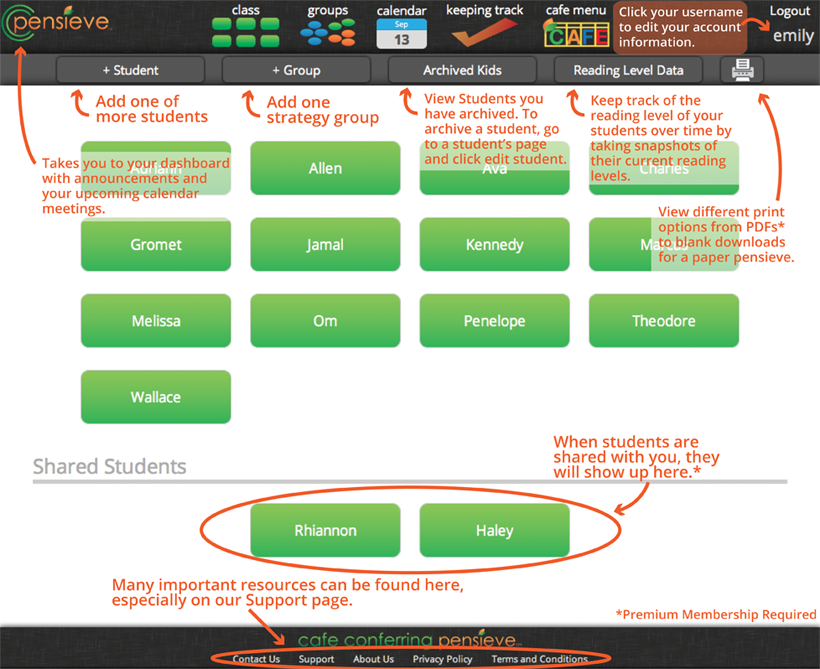
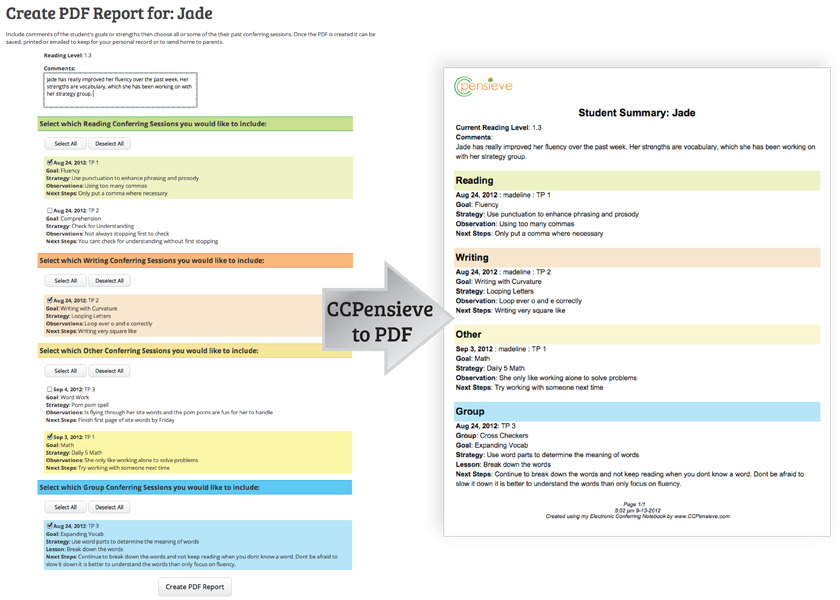
Have you heard of the Two Sister's produce called Cafe Conferring Pensive (CC Pensive)?

The CCPensieve is the only online conferring notebook created and endorsed by The 2 Sisters, the creators of the Daily 5 and CAFE. Beyond the popular features explained on the features page, the CCPensieve is fully integrated with The CAFE Menu's reading goals and strategies. Students can be shared between other CCPensieve members for ultimate Curricular Coherence.

While using the CCPensieve, you will realize how quickly you can enter information into the system. Once information is stored, you will be amazed how the information is displayed in many different ways making your conferring sessions more powerful, which helps to influence student success.


Does this sound like something you may want to try out in your classroom this year to see if it may work for you next year?   I think it has a place in every reading classroom!   Right now they are offering a free 30 day trial for their premium membership.   Check it out by clicking here.    


Thanks to our ELA Curriculum Specialist, Meghan Keefer, for alerting me of this awesome deal!

Tuesday, May 14, 2013

Minute Trick from Kara P - ITC at Emerson


Today I'm sharing a trick from Kara Pottinger, the ITC over at Emerson.   I love a good shortcut, and this one I had no idea!  Thanks for sharing, Kara!

COMMAND* + F
For today's Minute Trick, I am pulling out my favorite hidden keyboard shortcut.  We all know command+x for cut, command+c for copy, and command+v(Think Velcro) for paste, but do you know command+F?

This keyboard shortcut can be used on any document, website, or window to search for text.  
First, a generic search bar will appear in the top right corner of the window.  As a you type, the matching text is highlighted.  It even gives a count of how many times your query appears in the window. You can use the up and down arrow to find the different places you appear.

This comes in handy whenever you are looking for a needle in an electronic haystack?  For example, looking for a specific name in a spreadsheet (a student score in building map score spreadsheets?) or a specific piece of information in an website article.  If you are writing the same email to different students' parents with the same information but have to use pronouns, you can copy the email text into a new email then find all of the "he"s and turn them into "she"s.

In my classroom, I had students use this shortcut when writing dialogue to find the very overused word "said" and replace it with more descriptive words.  You can also have them find all of the times they used pronouns or this/that to help improve their clarity.

Go ahead and try it right now.  Hold down the command and f at the same time.  When the search bar appears in the top right corner, type "command".  Do you see the highlighting?  Can you move through all the different places it is used?  BONUS:How many times do I use the word command?

*Remember, that the command button is the open apple button on older laptops.

Answer: 9 times, the word command was used.  Oops, now it is 10.

Monday, May 6, 2013

Word Clouds

A word cloud of my job description.
I loved using Wordle in the classroom to have students summarize major units of study or as a simple get to know you activity at the beginning of the school year.  However, I came across this presentation below about different ways to use wordle in the classroom.   Some of my favorites included:

  • #10 - Having students come up with rules/norms for your classroom
  • #11 - Finding key words or ideas in a speech
  • #15 - Reporting out data on a classroom poll
  • #23 - Character Descriptions
  • #26 - Wordle walk - similar to a picture walk
  • #27 - Make a unique gift - like a mother's day wordle
  • #37 - Give students a self-esteem boost & improve relationships

Forty Interesting Ways To Use Wordle In The C from Vreed17


If you are not a huge Wordle fan, ABCYA also has a word cloud generator called Word Clouds for Kids.  Click here to give it a try!