Showing posts with label edtech. Show all posts

Wednesday, May 7, 2014

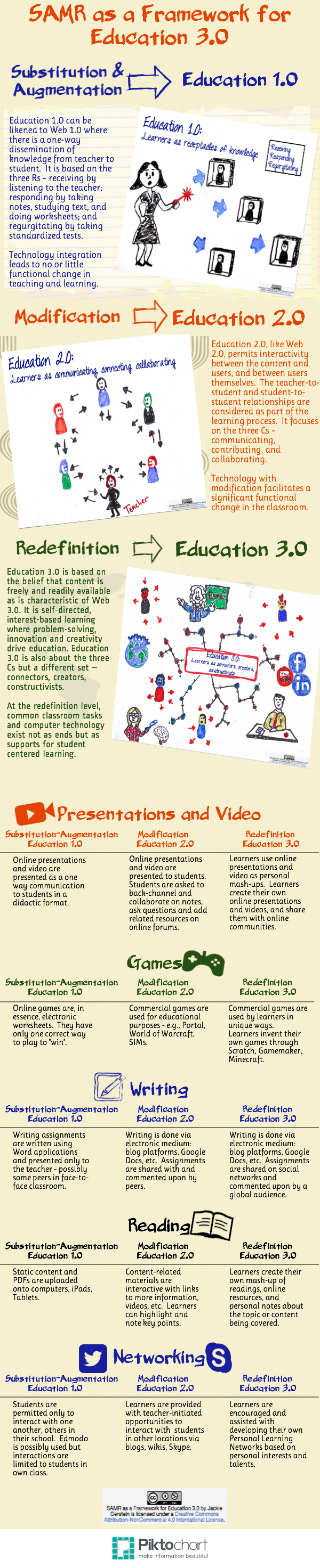
Great SAMR Model Infographic

Check out this infographic I saw today on the SAMR Model... I think it really has some great ways of thinking of tech in the classroom.

"SAMR, a model designed to help educators integrate technology into teaching and learning, was developed by Dr. Ruben Puentedura, Ph.D.. The model aims to enable teachers to design, develop, and integrate digital learning experiences that utilize technology to transform learning experiences to lead to high levels of achievement for students." 

Sunday, April 6, 2014

Look How Far We've Come...

Look at how technology has evolved through the ages... 


Look at some of the cool stuff happening in technology now...


Let's do this!

Infographics from WebWiseTutors


Friday, March 28, 2014

SAMR Model

I know I've mentioned the SAMR model on here before, however, I wanted to share the awesome video explaining how you can really start taking your instruction, "above the line".

"SAMR, a model designed to help educators integrate technology into teaching and learning, was developed by Dr. Ruben Puentedura, Ph.D.. The model aims to enable teachers to design, develop, and integrate digital learning experiences that utilize technology to transform learning experiences to lead to high levels of achievement for students." 


SAMR Model: Explained from EasyBib on Vimeo.


As we are embarking on the third trimester, let's attempt to make modify or redefine some of your lessons.  Please let me know how I can help you integrate this idea into your practice. 

Thursday, March 6, 2014

Tech Talk Week

Have you been keeping up with all of the tech talk week emails?   This was a unique way to educate parents on a daily basis about how we are using technology in District 64.   You may notice that Roosevelt has some awesome representation.  Here are the videos just in case you wanted to catch up. :)

See how our students are using technology as they communicate, collaborate, apply critical thinking skills, and share their creativity through 21st Century Learning.


Explore how “Differentiation” using technology is helping us better meet the needs of every child. Hear how teachers use tech tools to gather real-time feedback from students about their learning, and adjust instruction to better meet their needs. Listen to students explain how technology tools let them work at their own pace and skill level.


Technology is more than just fun; it supports students working together to do work that matters. Hear a teacher describe how technology can motivate, bring meaning to learning and spark curiosity to help students grow. 

Monday, March 3, 2014

Techy Terms Tuesday

Do you remember in the fall, taking the Level of Teaching Innovation (LoTi)?  I know it was the week of conferences, and we had some log in issues, however, the LoTi is meant to help give you some areas to improve on in your teaching.  One of the biggest complaints I received about the LoTi was the complex "techy" vocabulary used in the survey.   Since we will be taking the survey again in the spring, I thought it might be a great idea to transform some of the complex language into teacher friendly terms - as I think we are all super innovative educators - and I know that will be reflected in the upcoming survey!


Standards-based Learning Experiences 

A standard is a statement of what students should know and be able to demonstrate.  Therefore, a standards-based learning experience is any lesson/activity/learning experience that happens in your classroom that is based on the standards your students are assessed.

Simply put, standards-based learning experiences are pretty much every lesson or activity that happens in your classroom on a daily basis!

Digital Tools 

Digital tools commonly include laptop computers, mobile devices, software applications, web-based applications, digital cameras, printers, probes, MIDI devices, interactive whiteboards, scanners, analog video cameras, digital video cameras, multipurpose calculators, and video-conferencing equipment available for instructional use in your classroom.


Simply put, digital tools are all of the technologies that you use with your students including the hardware, software and Internet.


Environmental Resources 

Environmental resources commonly include any form of non-print materials including manipulatives, displays, dioramas, original photos, original artifacts, measurement devices, household or store products available for instructional use in your classroom..

Simply put, environmental resources are the hands on teaching tools we use every day. 

So if we were to look at the survey questions...
  • How often are your students involved in standards-based learning experiences during the instructional day?
  • How often are you (the teacher) using digital tools and/or environmental resources during the instructional day?
My guess is that every teacher at Roosevelt would respond "multiple times per day" given all of the amazing teaching going on here!

Stay tuned for next week when I break down complex thinking strategies & content standards. 
Thursday, February 27, 2014

Year of Code


Did you and your students participate in the "Hour of Code" in the fall?  I know the buzz around Roosevelt was positive with those who did the activity with their students.   Now, there is a movement called #yearofcode in the UK - trying to get as many people as possible to try coding.

They have a great game called "Moshi Pong" that may be fun for your students - or you to try!   Click here to play the game and try coding.


Tuesday, February 25, 2014

Keeping the Balance

Today's students, especially in District 64, have access to a variety of different resources that enhance their learning.   To name a few that we all know and love, SMART Boards, iPads, Chromebooks, etc.   With such an increase in technology for our students, comes an increase in screen time.  According to the American Academy of Pediatrics, children today are spending an average of seven hours a day on entertainment media including T.V., computers, phones, and other entertainment media. As educators, it is important for us to find a good balance and make conscious choices about when technology is appropriate and how it can be used to engage students in meaningful learning.   Click here to read a great article about the balance of screen time.  The article cites some great examples or choosing when to use technology, however, I like the three questions the author thinks about when choosing technology to use in the classroom:

  • Is it appropriate?
  • Is it meaningful?
  • Is it empowering?
These are great things to keep in mind when looking at the ultimate goal of what goals you are trying to achieve with your students.  If you would like help planning in this matter, I'd be happy to help make sure we are using technology in appropriate, meaningful, and empowering ways - just let me know!


Monday, December 2, 2013

Class Dojo Attendance

Last February, I blogged and introduced you to Class Dojo.   Click here to see the original post.  I know that we have a few teachers at Roosevelt who love using Class Dojo with their students and parents.  Now, Class Dojo is offering a new feature!   They now also have a fun way to take attendance!  

ClassDojo Attendance lets you:
  • Easily and quickly take attendance
  • Spot trends with beautiful, simple attendance data
  • Help students be on time by tracking “lates”
  • Take attendance from your laptop, iPad, iPhone or Android device


What is ClassDojo?

ClassDojo is a classroom tool that helps teachers improve behavior in their classrooms quickly and easily. It also captures and generates data on behavior that teachers can share with parents and administrators.  Better learning behaviors, smoother lessons and hassle-free data - and its free! 


Do either of these wound like something you'd like to try in your classroom?  Let me know and I'd be happy to help you set it up!

Friday, November 15, 2013

Hour of Code

We live in a world surrounded by technology. But only a tiny fraction of students learn how computers work, or how to create software technology. Computer Science provides a foundation for virtually any career and all our students can benefit from learning the basics. 

This year, for Computer Science Education Week, a massive campaign called the Hour of Code is introducing 10 million students to try one hour of introductory computer science.

Watch the video below to find out more or check out the Hour of Code website by clicking here.  Are you interested in your class participating?   Let me know and I'd be happy to help set it up for you!

Wednesday, October 2, 2013

Why is Ed Tech Important?

Today I read a great article on Edudemic about why ed tech is so important.  I thought the info graph below really had some great points.   We are always looking for ways to improve student learning - how can technology get us there?  I'd love to hear your comments!  Please feel free to comment below. 


Friday, September 20, 2013

21st Century Classroom

Today I had a meeting with all of the Instructional Coaches in the district.  We had a ton of great discussion and planning, but were also sharing many resources with each other.  Amanda Pelsor, ITC at Carpenter, shared this awesome infograph on her blog... and I thought it was very interesting. Click here to make it bigger and easier to read.  Enjoy & have a great weekend!

A great infographic about some of the major shifts in teaching and learning in a 21st Century Classroom from Open Colleges.


Monday, September 16, 2013

Library of the Future

Check out this awesome library of the future... I'm not too sure that I want my kids growing up WITHOUT physical books... however, this is a very interesting concept.   I'll all about a good balance - but this would be an awesome resource to have at your disposal.

Visit NBCNews.com for breaking news, world news, and news about the economy

Monday, May 6, 2013

Word Clouds

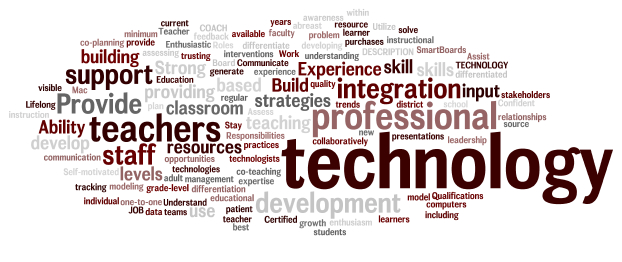
A word cloud of my job description.
I loved using Wordle in the classroom to have students summarize major units of study or as a simple get to know you activity at the beginning of the school year.  However, I came across this presentation below about different ways to use wordle in the classroom.   Some of my favorites included:

  • #10 - Having students come up with rules/norms for your classroom
  • #11 - Finding key words or ideas in a speech
  • #15 - Reporting out data on a classroom poll
  • #23 - Character Descriptions
  • #26 - Wordle walk - similar to a picture walk
  • #27 - Make a unique gift - like a mother's day wordle
  • #37 - Give students a self-esteem boost & improve relationships

Forty Interesting Ways To Use Wordle In The C from Vreed17


If you are not a huge Wordle fan, ABCYA also has a word cloud generator called Word Clouds for Kids.  Click here to give it a try!

Thursday, May 2, 2013

App of the Week: NearPod

App:  NearPod

Who is it for?   K-5 (Only on cart 3 currently)

What's Nearpod?
The Nearpod platform enables teachers to use their iPads to manage content on students' iPads, iPhones or iPods. It combines presentation, collaboration, and real-time assessment tools into one integrated solution.  To create an account or log in as a teacher you need to download the Nearpod app on an iPad. The Nearpod app for iPhone or iPod allows student access only.


Nearpod can be used in all subject areas with any and all content.   Are you interested in trying it out?   Let me know and we'll try it out!!!

Saturday, April 20, 2013

New Socrative Features

So, I do realize that sometimes I can be a total dork, however, in my inbox this morning was an email from Socrative saying that they had added some new features... and I got excited.

Socrative is a smart student response system that empowers teachers to engage their classrooms through a series of educational exercises and games via smartphones, laptops, and tablets.  We've used it in a variety of presentations this year as well as I know many teachers are fans.   The two new updates are:

  • Self Grading Quizzes
  • Adding Images into Questions

For me, I'm most excited about the adding images into questions, as that's something that I've struggled with using both Socrative and Google Forms.

Richard Byrne, who writes the blog, Free Tech for Teachers, created a great video explaining these new features.   Check it out below!

Sunday, April 14, 2013

Using Technology vs Technology Integration

I found this chart on Pinterest and thought it really helped explained the difference between Using Technology and Technology Integration.  Research shows that technology integration has a greater impact on student learning.  


After reading the chart, how can I help you move from using technology to technology integration?   Let's talk about it!   Let me know a time that we can chat!

Monday, March 11, 2013

Coggle

Have you heard about Coggle?  I read about this free mind mapping tool on Free Tech for Teachers over the weekend and just had to try it out.

To create a Coggle mind map just sign-in with your Google account and click the "+" icon to start your mind map. After entering the main idea of your mind map you can add branches by clicking the "+" icons that appear next to everything you type. To re-arrange elements just click on them and drag them around your screen.

Coggle is also a collaborative tool using email to invite others to view your mind map.    Unfortunately, since our students don't have access to email yet, students could not share these with each other, however, they could share them with you!

If you are interested in trying out Coggle with your students, let me know!  I'd be happy to help you and your students.  Check out the Coggle I created below to help me plan for a session with a teacher.  


Thursday, March 7, 2013

App of the Week: Creative Book Builder

Are you looking for a fresh way for your students to publish their work?  Wouldn't it be cool for them to write their own book?   If you think this is something that your students would be interested in, check out this app!

What is it?

Creative Book Builder is a fantastic app that allows students to create books in epub format, which can then be exported to iBooks and shared with others. There are a variety of instructional uses for this app, from using it as a publishing tool for project-based learning to a summative assessment at the end of a unit.  Students can embed images, audio files, video files, and write text.  The advantage of an epub document over a PDF document is that all of the media will be preserved and available for readers to interact with when the final product is published.  


Who is it for?
I can see this being used at all different grade levels, from a class book to students or groups of students creating their own books.   This can be use across subject areas as well - with an exciting way to share information.

One of other ITCs has also created a Google Folder with helpful how-tos on how to use Creative Book Builder in your classroom.  Click here to view her helpful tutorials.  Thanks to Amanda Pelsor for sharing!   I also found a very helpful slideshow in getting started with Creative Book Builder.  Check it out below.   Of course, if you want help, just ask!  I'm eager to try out this app with a class!

Check out How to Use Creative Book Builder by Penelope Doyle on Snapguide.

Monday, March 4, 2013

Flipping Out?

I know that ISATs, report cards, conferences, the big snow storm, committee meetings, trying to fit into your swim suit before spring break, among other things may have people flipping out!   But this is a different kind of flipped...

Flipped Classroom
Created by Knewton and Column Five Media


There are many great resources to help you with flipping your classroom.  Like TedEd for example, which has videos, resources, and questions to assess students learning after watching the video.


TED-Ed is a great resource for teachers with instructional videos for students, like the one about water above, as well as great some great professional videos for teachers.

TED-Ed has amazing resources for teachers... especially if you are considering flipping your classroom.   I'd be happy to help you flip your classroom if you are interested, even if it's trying it for a lesson!   After the ICE Conference and some good researching, I feel that we can flip classrooms, even in elementary school!  Let me know if you are interested in trying out this concept with me!

Tuesday, February 26, 2013

Class Dojo

On Monday morning, I started my day in Berwyn School District #100 touring one of their elementary schools as well as one of their middle schools.   We were observing Berwyn's awesome 1 to 1 program, which I thought was beyond amazing.  While touring the school, one of the teachers was using Class Dojo - an interactive tool that helps with classroom management.  I had read about Class Dojo before, however, never had seen it in action.   After seeing it in action on Monday, then showing it to a few teachers today, I think it would be an awesome tool for any classroom teacher!

What is ClassDojo?

ClassDojo is a classroom tool that helps teachers improve behavior in their classrooms quickly and easily. It also captures and generates data on behavior that teachers can share with parents and administrators.  Better learning behaviors, smoother lessons and hassle-free data - and its free! 


How does it work?
ClassDojo improves behavior in class with just one click of a smartphone, laptop, or tablet.

Instantly reinforce good behavior.
Easily award feedback points for behavior in class in real-time, with just one click of your smartphone or laptop. This actually improves behavior.

Engage students in minutes.
ClassDojo provides instant notifications for your students (‘Well done Josh! +1 for teamwork!’). All fully customizable for your classroom.


Get hassle-free data and reports.
ClassDojo gives you behavior-tracking analytics and reports that can be shared with parents and administrators, all with just one click. No data entry needed, ever.


The video below is a great way to introduce Class Dojo to your students.  If you want to see more or want help setting this up for your classroom, let me know and I'd be happy to help!