Showing posts with label ELA. Show all posts

Wednesday, May 14, 2014

Spell Up: A New


Spell Up is a new word game that can help to improve English skills in a fun and educational way.

Whether they are just learning English or are already experts, have students give it a try: https://spellup.withgoogle.com/

I played it for about 20 minutes - it's not perfect but it's a lot of fun!

Tuesday, April 22, 2014

English is Crazy!

I saw this video on another coaches blog - an it was too interesting not to share.... Enjoy!


Thanks, Mike Johnson, for sharing with me!

Monday, April 14, 2014

Happy National Library Week!

Did you know that it's National Library Week?    Ms. D & Ms. Sara in the LRC were busy making the awesome "Our Library Makes Us Happy" video in honor of the week!   Check it out below.


Did you also know that Ms. D has an amazing website filled with great resources for students and teachers?   Check it out by clicking here.

Thanks to Ms. D & Ms. Sara for making the Roosevelt LRC nothing short of amazing & Happy National Library Week!


Monday, March 24, 2014

Point of View

Have you ever wanted to know what it would be like to experience life as if you were an eagle soaring through the air?   Check out this video to fly like an eagle.   This would be a great video to show then have kids write about their point of view if they were an animal... or even just discuss.   Enjoy your flight!


Thursday, December 5, 2013

Room 312's Survival Handbook

Currently, Mr. Mulvihill's 5th grade class is in the middle of their rotation of using the Chromebooks as well as just finished reading the novel, My Side of the Mountain.   Mr. Mulvihill has traditionally read this novel with his 5th grade class and has had the students keep track of different plants and animals that are used as a means of survival, while reading the novel.   This year, with the Chromebooks at Room 312's fingertips, they were were able to take this survival study a bit further.  In collaborating with myself, the Instructional Technology Coach, and Ms. Diekman, we were able to come up with an awesome project ot take their findings a step further.  Ms. Diekman, our wonderful Library Information Specialist, worked with Room 312 showing them how to research and take notes on the different survival items that were in the novel they read. After completing the research with Ms. D, then I went into his classroom to teach the kids how to use Google Sites.  As a class, collaborating on research and collaborating on creating a website, you can see how their hard work has transformed into a wonderful working website.  Please click here to view the website.


This project was a great way to meet many of our National Educational Technology Standards (NETS) while deepening the student's understanding of how different plants and animals can be used for survival.   In addition to meeting the NETS standards for students, this activity also met a variety of the Common Core State Standards for English Language Arts.
  • CCSS.ELA-Literacy.RL.5.10 By the end of the year, read and comprehend literature, including stories, dramas, and poetry, at the high end of the grades 4–5 text complexity band independently and proficiently.
  • CCSS.ELA-Literacy.W.5.6 With some guidance and support from adults, use technology, including the Internet, to produce and publish writing as well as to interact and collaborate with others; demonstrate sufficient command of keyboarding skills to type a minimum of two pages in a single sitting.
  • CCSS.ELA-Literacy.W.5.7 Conduct short research projects that use several sources to build knowledge through investigation of different aspects of a topic.
  • CCSS.ELA-Literacy.W.5.8 Recall relevant information from experiences or gather relevant information from print and digital sources; summarize or paraphrase information in notes and finished work, and provide a list of sources.
Mr. Mulvihill's class did an amazing job on this assignment, and their website looks amazing!   I hope you enjoy reading their hard work and seeing an excellent sample of success from our 5th graders!   If you think this is an activity that you'd like to try in your classroom, please let me know!

Monday, November 18, 2013

Power Up Your Teaching and Learning

My fabulous friend and amazing Curriculum Specialist friend, Meghan Keefer, shared an awesome resource with me that I had to pass on to the blog world.  Power Up WHAT WORKS is a fantastic resource for teachers that provides free evidence-based resources to elevate your professional learning.  Power UP WHAT WORKS is a free, comprehensive guide to technology-enhances teaching and learning in English Language Arts and Math to help struggling students meet the Common Core State Standards.  This site is packed full of resources that you can use for your own professional development or for really using powerful instructional strategies.  For example, if if I click on "English Language Arts" I get a variety of Instructional Strategy guides like you see in the picture below.  They include information about relevant Common Core State Standards, evidence-based practices, and ways to differentiate instruction with technology. The Guides provide value to teachers, as well as PD leaders, teacher educators, and administrators.  I'd love to help you use this in your practice, and I'm sure Meghan would too!   Let us know if you'd like to explore this together to POWER UP your instructional strategies!  If you are interested as well, they do have a blog that you can follow to keep up with their new resources.  Check it out by clicking here.

Thursday, November 7, 2013

District 64 Storytown Harcourt Resources


As I mentioned at staff meeting on Wednesday, the other elementary coaches and I try to download as much material from the PCOBE Storytown Resources website as we could, and now we're sharing it on ELA website on the District Portal.  If you'd like easier access, please click here or use the Teacher Resources Link on the right side of my blog.   If you have other resources to add to this page, just let me know!

Wednesday, October 30, 2013

Parody: A Great Video

I don't know if you are a fan of Showtime's hit show, Homeland, with Claire Danes, however, this parody is hysterical by Sesame Street.  My educational connection is below...


If you were going to teach your students about what a parody is, Sesame Street's You Tube Channel has a variety of parodies using their kid friendly and well recognized characters.    If you need help accessing You Tube in your classroom, please let Allison or myself know and we'll get you set up!

Tuesday, October 29, 2013

Have you ever wondered about using KidBlog?

Many teachers use Kidblog to blog with their students.  Do you know how easy it can be?  

What is Kidblog?

Kidblog is built by teachers, for teachers, so students can get the most out of the writing process. Our mission is to empower teachers to embrace the benefits of the coming digital revolution in education. As students become creators - not just consumers - of information, we recognize the crucial role of teachers as discussion moderators and content curators in the classroom. With Kidblog, teachers monitor and control all activity within their classroom blogging community.  
Kidblog is designed for K-12 teachers who want to provide each student with an individual blog. Students publish posts and participate in academic discussions within a secure classroom blogging community. Teachers maintain complete control over student blogs and user accounts. 
Use Kidblog to:
  • create classroom discussions
  • learn digital citizenship
  • practicing writing skills
  • create an e-portfolio
  • reflect on learning
  • formatively assess writing
 - from Kidblog


Kidblog is also a safe way for students to share information with you, each other, or the world!  As the teacher you can set up the privacy settings however you wish as well as have control about the comments and posts in your classroom.  On Google +, I read about a 2nd grade teacher who was sharing her student's Arctic Habitat's with the world.   Click here to see her student's work - along with how she uses the blog on a daily basis to get students writing about a topic.   Click here to see her student's entries and awesome work.   Feel free to comment on their reports as well!  Imagine how cool it would be to be getting comments on your published work from people around the country - or the world!


Thursday, October 17, 2013

Movie Shorts and Reading Strategies

Some days I really love pinterest.   Today I found an awesome resource from a blog called, Technology Up to Speed.  A fifth grade teacher compiled a list of various movie shorts that are appropriate for kids in helping teaching reading strategies.

This first google doc link is to a list of animated shorts. She has included the youtube links and what reading strategies with which she believes they work the best. 

The second google doc link is to a list of graphic organizers to use with each short.  They are not specific to the short and can be used for any resource.  There is one graphic organizer for each reading strategy.  

This is a valuable resource that would also be great to use with the SMART Board!   If you need help using You Tube, just ask Allison or myself!

Wednesday, October 9, 2013

The Poetry Foundation

Are you looking for a engaging way to incorporate poetry into your lessons?   The Poetry Foundation, which is located in Chicago, has an amazing website that is packed full of resources.   The one that especially caught my eye at the CAWP conference was that you can actually have authors read their poems to you!  When you go to their website, click on the "Poems & Poets".  You can browse by poems, poets, or season poems.   When you are browsing, you can search for poems that include audio and that are good for children.  How great to include a poem in a "bouquet" of texts you use in your close reading instruction, and then have the author read the poem to your students.   Be sure to check it out!

Tuesday, October 8, 2013

Reading Rewards


Are you looking for a more engaging way to hold your students accountable for their reading at home or at school?   I learned about a site called Reading Rewards at the conference I was at last Friday.   The best thing about this is free website has a lot to off teachers, parents, and librarians.  As a group administrator, you will be able to create and manage reading groups, set up reading incentives for your readers, and even log reading time yourself.

Creating a free account is quick and easy.  Once you create your account, your next step is to create a group for your classroom, and add your students as members.  Once you do that you'll be easily able to track students' reading progress, sharing reading lists, and even set up some customized reading rewards for them.  Talk about a great reading incentive!

Do you want more information specifically for teachers?  Click here for their teacher page or just ask me for help!

Sunday, October 6, 2013

Welcome to 82nd & Fifth: The Metropolitan Museum of Art

On Friday, I attended the Chicago Area Writing Project's (CAWP) Fall Conference.  I had the pleasure of listening to Carol Jago, literacy expert, discussing how to inspire our practice as teachers of literacy, even with the Common Core. She had a variety of amazing lessons, including "bouquets" of text to present lessons.  One of the ways she presented us with text was through an amazing video project through the Metropolitan Museum of Art called, Welcome to 82nd & Fifth.  

82nd & Fifth is the Met's address in New York City. It is also the intersection of art and ideas. We've invited 100 curators from across the Museum to talk about 100 works of art that changed the way they see the world, and eleven Museum photographers to interpret their vision: one work, one curator, two minutes at a time.

82nd & Fifth is a year-long series of 100 episodes. Throughout 2013, new releases will appear every Wednesday.

These short videos show how these curators view the pieces of art in the museum - two minutes of deep details about each piece of work is a great way to model how we want our students talking about reading.  These videos are great examples of digging deeper - a great way to engage students in conversation and a great way to model how we want kids thinking about what they read.   I encourage you to check it out!  

Thursday, September 26, 2013

Podcasting and Fluency


Check out this week's post from Bits & Bytes:

This year, more teachers across grade levels are implementing The Daily Five in their Reading blocks. The Daily Five is a structure that helps students develop the daily habits of reading, writing, and working independently that will lead to a lifetime of literacy independence.   When implementing the Daily Five structure students can choose between the following literacy activities:

  • Read to Self
  • Work on Writing 
  • Word Work
  • Listening to Reading
  • Read to Someone
Currently, many teachers are working on building up these routines in their classrooms and getting in the groove of these activities while the teacher works with small groups or conferences with individual students. I've been lucky enough to plan some lessons with teachers to help infuse technology in the Daily Five.   I've been training classrooms and working with individual students on Podcasting as a part of the "Listening to Reading" component.   How this activity works is a student goes to the "Listening to Reading" Center where there are headphones with a microphone and a laptop that has the program Garage Band.  Students then record themselves reading a passage or poem selected by their teacher.  Once they record themselves reading, they then can listen to their recording and make notes on the page of what they've read.   Students then save their Podcast, then fill out a self evaluation about their reading.   By making this a regular part of the reading block, students will be able to go back and listen to themselves read and track improvement over time.  Teachers can also go and listen to what the student records and have the ability to conference with their students with their Oral Reading Fluency progress.   Students can then set their own goals for improvement.   Technology is changing how students learn in this activity as it is giving them the opportunity to go back and hear themselves read.   We used to accomplish this task with whisper phones or PVC pipes where they could read to themselves but offered little opportunity for reflection.  Everyone benefits from this use of technology!

A student records herself reading a poem. 
Here a student listens to their recording of himself reading a poem.

If you'd like to implement this in your classroom, just ask!    


Wednesday, September 18, 2013

Leveled Readers & the iPads

Did you know, that you can access the Leveled Readers that are associated with Storytown on our iPads?   All you need to do is from an ipad, either scan this QR code below or go to this link.  If you are are not logged into your Google account, it will prompt you to do that first.  Then you can click on your grade level, choose your lesson, download the book, then open it in iBooks.  Quite a few teachers are using these for Running Records or in their classrooms during their reading blocks.

Do you need a step by step tutorial?  Check one out by clicking here.     If you'd like a handy print out with the QR code - click here and you can print it from Google Docs.    Let me know if you need any help!


Wednesday, September 11, 2013

We Give Books

I'm all about a good, free resource.   Especially one that will help others by using it.

Today, a friend of mine shared with me the site We Give Books.  This site allows you to read books on your computer or SMART Board from their extensive library!   They are broken into various age categories.  There are books for various age groups - starting at babies all the way until age ten. The books include a mix of fiction and nonfiction, a range of authors, and an equal balance between read alouds and books for independent readers.    The We Give Books team is committed to adding books every month, together with seasonal offerings.  This digital initiative enables anyone with access to the internet to put books in the hands of children who don't have them, simply by reading online!   The more books you and your class read from We Give Books, the more books they donate to children in need.

To get started, all you need to do is create a free account, then click on read - and scroll through this here.  
surprising large library.   There are also some great educator resources which has activities to go along with the various book - check them out by clicking

After exploring this website today - I could see uses at all elementary grade levels - as well as reading some of these stories to my kids at home!    Some of the "editors picks" books even work on the iPad - no app required.   The library isn't as large, but using the Safari Internet App that is on all iPads, you can log into your account and read books on there as well.    I hope you find this to be an awesome resource - as I think it's truly a fabulous find.


Special thanks to Barbie Murphy for sharing this awesome site with me!

Monday, May 20, 2013

FREE Resource!


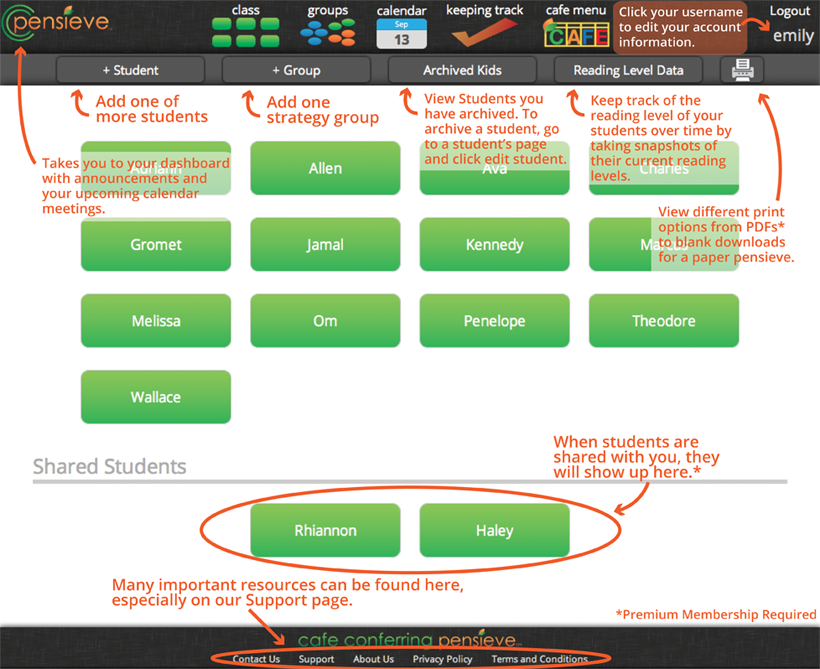
Have you heard of the Two Sister's produce called Cafe Conferring Pensive (CC Pensive)?

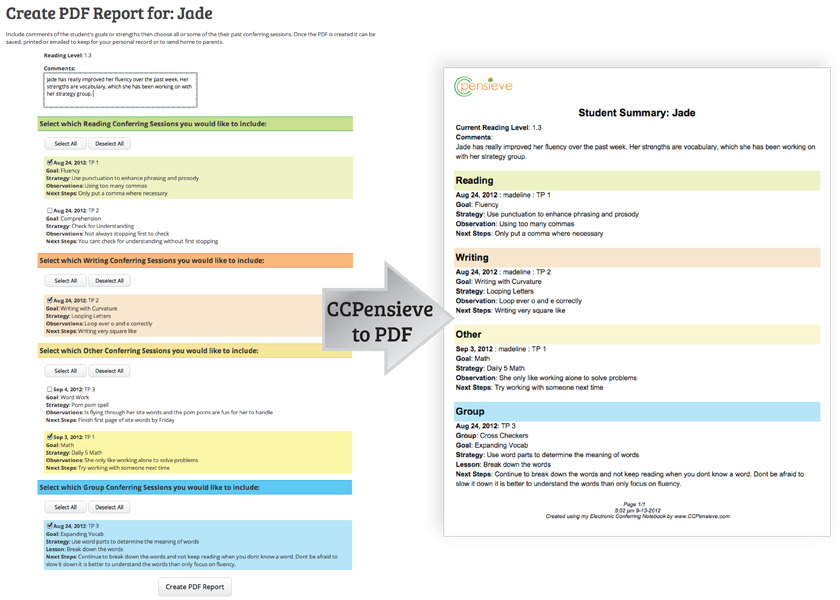
The CCPensieve is the only online conferring notebook created and endorsed by The 2 Sisters, the creators of the Daily 5 and CAFE. Beyond the popular features explained on the features page, the CCPensieve is fully integrated with The CAFE Menu's reading goals and strategies. Students can be shared between other CCPensieve members for ultimate Curricular Coherence.

While using the CCPensieve, you will realize how quickly you can enter information into the system. Once information is stored, you will be amazed how the information is displayed in many different ways making your conferring sessions more powerful, which helps to influence student success.


Does this sound like something you may want to try out in your classroom this year to see if it may work for you next year?   I think it has a place in every reading classroom!   Right now they are offering a free 30 day trial for their premium membership.   Check it out by clicking here.    


Thanks to our ELA Curriculum Specialist, Meghan Keefer, for alerting me of this awesome deal!

Monday, May 6, 2013

Word Clouds

A word cloud of my job description.
I loved using Wordle in the classroom to have students summarize major units of study or as a simple get to know you activity at the beginning of the school year.  However, I came across this presentation below about different ways to use wordle in the classroom.   Some of my favorites included:

  • #10 - Having students come up with rules/norms for your classroom
  • #11 - Finding key words or ideas in a speech
  • #15 - Reporting out data on a classroom poll
  • #23 - Character Descriptions
  • #26 - Wordle walk - similar to a picture walk
  • #27 - Make a unique gift - like a mother's day wordle
  • #37 - Give students a self-esteem boost & improve relationships

Forty Interesting Ways To Use Wordle In The C from Vreed17


If you are not a huge Wordle fan, ABCYA also has a word cloud generator called Word Clouds for Kids.  Click here to give it a try!

Sunday, April 28, 2013

Looking for Ways to use Comic Life?

I know back in January, I wrote about Comic Life.   However, recently I co-taught a fun project in 5th grade using Comic Life and I couldn't be more impressed with the results - and the students' creativity!  Walk past Erin McCoy's room to see what I'm talking about - they are awesome!!!

If you are interested in trying out Comic Life, let me know!  I'm always happy to help!!!


Wednesday, April 24, 2013

Word Order Matters

This is a great 2 minute video about why word order matters in Google Searches.  This video was created by Daniel M. Russell, whose job is to study the way people search and research. 
I hope that you and/or your students find this information useful!   Check out Daniel M. Russell's blog to learn more about searching in Google!